
Introduction
Running a small business in today’s competitive digital world is not easy. Every business owner wants more website traffic, quality leads, and higher sales without spending a huge marketing budget. This is where Google Ads for Small Business becomes one of the most effective online advertising solutions.
Google Ads allows businesses to reach customers who are actively searching for products or services on Google. Unlike traditional advertising, you only pay when someone clicks on your ad, making it a cost-effective way to attract potential customers.
Whether you own a local business, startup, eCommerce store, or service-based company, Google Ads for Small Business helps you increase brand visibility, generate qualified leads, and improve conversions. In this complete 2026 guide, you’ll learn how Google Ads works, how to create profitable campaigns, improve your return on investment (ROI), and avoid common advertising mistakes.
Table of Contents
-
What Is Google Ads?
-
Benefits of Google Ads for Small Business
-
Why ROI Matters in Google Ads
-
How to Improve Google Ads ROI
-
Target High-Intent Keywords
-
Use Long-Tail Keywords
-
How to Set Up Your First Google Ads Campaign
-
Optimize Landing Pages
-
Low Budget Google Ads Strategy
-
Google Ads Tips for Local Business
-
Common Google Ads Mistakes
-
Key Metrics to Monitor
-
Advanced Tips for Maximum ROI
-
FAQs
-
Conclusion
What Is Google Ads?
Google Ads is Google’s online advertising platform that allows businesses to display advertisements on Google Search, YouTube, Google Maps, Gmail, and millions of websites within the Google Display Network.
Whenever users search for products or services related to your business, your ads can appear at the top of Google search results. Businesses only pay when someone clicks on their advertisement, which is why Google Ads follows a Pay-Per-Click (PPC) advertising model.
Because users are already searching for your services, Google Ads for Small Business delivers highly targeted traffic that often converts into customers.
Google Ads offers several advantages, including:
-
Instant visibility on Google Search
-
Highly targeted audience
-
Flexible advertising budgets
-
Fast lead generation
-
Real-time performance tracking
-
Increased website traffic
-
Higher sales opportunities
-
Better return on investment (ROI)
For small businesses looking to compete with larger brands, Google Ads provides an affordable and measurable advertising solution.
Benefits of Google Ads for Small Business
There are many reasons why businesses choose Google Ads for Small Business instead of relying only on organic marketing.
1. Instant Visibility
Unlike SEO, which may take months to produce results, Google Ads can place your business on the first page of Google within hours after launching your campaign.
2. Highly Targeted Advertising
Google Ads allows you to target customers based on:
-
Location
-
Age
-
Device
-
Language
-
Interests
-
Search intent
This ensures your ads reach people who are most likely to become customers.
3. Flexible Budget
One of the biggest advantages of Google Ads for Small Business is that you control your budget. Whether you spend ₹500 or ₹50,000 per day, you remain in complete control of your advertising costs.
4. Measurable Results
Google Ads provides detailed reports showing:
-
Clicks
-
Impressions
-
Cost per Click (CPC)
-
Conversion Rate
-
Cost per Acquisition (CPA)
-
Return on Ad Spend (ROAS)
These insights help you optimize campaigns for better performance.
5. Better Lead Generation
Since your ads target users actively searching for your products or services, Google Ads often generates higher-quality leads than many traditional advertising methods.
Why ROI Matters in Google Ads
ROI (Return on Investment) is one of the most important metrics when running Google Ads for Small Business campaigns. It tells you whether your advertising budget is generating profitable results.
For example:
-
Ad Spend: ₹20,000
-
Revenue Generated: ₹1,00,000
This means your campaign generated five times the revenue compared to the money spent.
Instead of focusing only on clicks, businesses should measure:
-
Sales
-
Leads
-
Phone Calls
-
Form Submissions
-
Revenue
A campaign with fewer clicks but more conversions is often more profitable than one with thousands of visitors who never become customers.
How to Improve Google Ads ROI
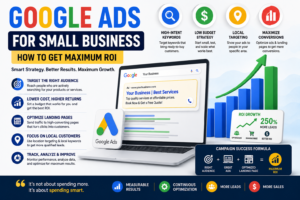
Improving the ROI of Google Ads for Small Business requires continuous optimization. Small changes can significantly improve campaign performance while reducing advertising costs.
Here are some proven strategies.
Target High-Intent Keywords
Not every keyword generates sales.
Focus on keywords that show strong buying intent.
Examples include:
-
Best accounting software for startups
-
Emergency plumber near me
-
Affordable digital marketing services
-
Buy office furniture online
-
Digital marketing agency in Delhi
People searching these terms are usually ready to make a purchase.
High-intent keywords generally produce:
-
Better conversion rates
-
Lower customer acquisition costs
-
Higher ROI
Use Long-Tail Keywords
Long-tail keywords are longer and more specific search phrases.
Instead of targeting:
Shoes
Target:
Buy running shoes for men online
Long-tail keywords usually have:
-
Lower competition
-
Lower Cost Per Click
-
Better conversion rates
-
More targeted traffic
For Google Ads for Small Business, long-tail keywords are an excellent way to compete with larger companies that have bigger advertising budgets.
How to Set Up Your First Google Ads Campaign
If you’re new to Google Ads, follow these simple steps to launch your first campaign successfully.
Step 1: Create a Google Ads Account
Visit the Google Ads platform and create your business account using your Google account.
Step 2: Choose Your Campaign Goal
Select an objective based on your business goals.
Examples include:
-
Website Traffic
-
Leads
-
Sales
-
Brand Awareness
-
Phone Calls
Step 3: Select the Right Campaign Type
Google Ads offers multiple campaign types:
-
Search Campaign
-
Display Campaign
-
Shopping Campaign
-
Video Campaign
-
Performance Max Campaign
For beginners, Search Campaigns are often the best option because they target users actively searching for your services.
Step 4: Set Your Budget
Choose a daily budget that fits your business.
Many small businesses start with ₹500–₹2,000 per day and gradually increase spending after seeing positive results.
Step 5: Research High-Intent Keywords
Use Google Keyword Planner to identify keywords with:
-
High search intent
-
Good search volume
-
Moderate competition
Avoid broad keywords that attract irrelevant traffic.
Step 6: Write High-Converting Ad Copy
A successful ad should include:
-
Attention-grabbing headline
-
Relevant keywords
-
Clear benefits
-
Strong Call-to-Action (CTA)
For example:
Get Affordable Digital Marketing Services – Free Consultation Today!
Step 7: Create a Landing Page
Your landing page should match the message in your advertisement.
Include:
-
Fast loading speed
-
Mobile-friendly design
-
Clear headline
-
Trust signals
-
Customer testimonials
-
Strong CTA
Step 8: Launch and Monitor
Once your campaign goes live, monitor its performance regularly and optimize it based on conversions and ROI.
Optimize Landing Pages
Even the best Google Ads campaign cannot succeed if users land on a poorly designed webpage.
Your landing page should:
-
Load within three seconds
-
Be mobile responsive
-
Match your ad headline
-
Include a clear call-to-action
-
Build trust using reviews and testimonials
-
Make contact information easy to find
A well-optimized landing page can dramatically increase conversions while reducing advertising costs.
Low Budget Google Ads Strategy
Many business owners think successful advertising requires a massive budget.
The reality is that Google Ads for Small Business can generate excellent results even with limited spending when campaigns are properly optimized.
Start With a Small Daily Budget
Instead of spending a large amount immediately, begin with a manageable daily budget.
This allows you to:
-
Test different keywords
-
Measure conversions
-
Identify high-performing ads
-
Eliminate unnecessary spending
Once you identify profitable campaigns, gradually increase your budget to scale your results.
Google Ads Tips for Local Business
Local businesses can achieve excellent results with Google Ads for Small Business by targeting customers within a specific location. Whether you own a restaurant, salon, clinic, repair service, or retail store, local advertising helps you reach nearby customers who are ready to purchase.
Instead of showing ads nationwide, focus on the cities or areas where your business operates. This reduces wasted ad spend and improves conversion rates.
Use Location-Based Keywords
Location-based keywords attract users who are searching for services in a specific area.
Examples include:
- Best dentist in Delhi
- Digital marketing agency in Gurgaon
- Home cleaning services in Mumbai
- Electrician near me
- AC repair services in Noida
These keywords usually have high purchase intent and can generate quality leads.
Enable Call Extensions
Call extensions allow customers to call your business directly from your Google Ads without visiting your website.
Benefits include:
- More phone inquiries
- Faster customer communication
- Better user experience
- Higher conversion rates
This feature is especially useful for service-based businesses that rely on phone calls.
Collect Customer Reviews
Customer reviews build trust and improve your business credibility.
Encourage satisfied customers to leave reviews on your Google Business Profile. Positive reviews can increase your click-through rate (CTR) and help potential customers choose your business over competitors.
Common Google Ads Mistakes to Avoid
Many businesses fail to achieve good results because they make common advertising mistakes. Avoiding these errors can significantly improve the performance of your Google Ads for Small Business campaigns.
Ignoring Negative Keywords
Negative keywords prevent your ads from appearing in irrelevant searches.
For example, if you sell premium digital marketing services, you may want to exclude keywords such as:
- Free
- Cheap
- Download
- Jobs
- Course
Adding negative keywords helps reduce wasted clicks and improves your ROI.
Not Tracking Conversions
Many advertisers only monitor clicks, but clicks alone do not generate revenue.
Always track important conversion actions such as:
- Contact form submissions
- Phone calls
- Online purchases
- Newsletter sign-ups
- Appointment bookings
Conversion tracking helps you identify which keywords and ads generate the best results.
Using Only Broad Match Keywords
Broad match keywords can attract irrelevant traffic, increasing your advertising costs.
Instead, use a combination of:
- Exact Match Keywords
- Phrase Match Keywords
- Long-Tail Keywords
This approach provides better targeting and improves campaign performance.
Ignoring Mobile Users
A large percentage of Google searches come from mobile devices.
Ensure that your website:
- Loads quickly
- Is mobile-friendly
- Has clickable buttons
- Provides a smooth user experience
A poor mobile experience can reduce conversions and increase your bounce rate.
Key Metrics to Monitor
Tracking the right metrics is essential for improving the performance of your Google Ads for Small Business campaigns.
Click-Through Rate (CTR)
CTR measures how often users click on your ad after seeing it.
A higher CTR usually indicates that your ads are relevant and engaging.
Cost Per Click (CPC)
CPC shows how much you pay each time someone clicks your advertisement.
Lower CPC combined with quality traffic improves profitability.
Conversion Rate
Conversion Rate measures the percentage of visitors who complete a desired action, such as making a purchase or filling out a contact form.
A higher conversion rate means your ads and landing pages are performing well.
Cost Per Acquisition (CPA)
CPA tells you how much it costs to acquire one customer or lead.
Reducing CPA while maintaining quality leads increases your overall ROI.
Return on Ad Spend (ROAS)
ROAS measures the revenue generated for every rupee spent on advertising.
For example:
- Ad Spend: ₹10,000
- Revenue: ₹60,000
Your ROAS is 6X, meaning every ₹1 spent generated ₹6 in revenue.
Monitoring these metrics regularly helps optimize your campaigns and maximize profitability.
Advanced Tips for Maximum ROI
Once your campaigns start generating results, use advanced optimization techniques to improve performance even further.
A/B Test Your Ads
Never rely on a single advertisement.
Create multiple versions and test different:
- Headlines
- Descriptions
- Call-to-Action buttons
- Display URLs
Analyze the results and keep the highest-performing ads.
Schedule Ads Strategically
Display your ads only during the hours when your audience is most active.
For example:
- Business services: 9 AM – 6 PM
- Restaurants: Lunch and dinner hours
- Emergency services: 24/7
Ad scheduling helps reduce unnecessary spending.
Use Remarketing Campaigns
Remarketing allows you to target users who previously visited your website but didn’t convert.
These visitors already know your business, making them more likely to become customers.
Remarketing campaigns often deliver higher conversion rates than campaigns targeting new audiences.
Improve Your Quality Score
Google rewards advertisers with higher Quality Scores by reducing their Cost Per Click (CPC).
To improve your Quality Score:
- Use relevant keywords
- Write compelling ad copy
- Create fast-loading landing pages
- Improve user experience
- Increase CTR
A better Quality Score helps lower advertising costs while improving ad rankings.
Why Small Businesses Should Invest in Google Ads in 2026
As digital competition continues to grow, Google Ads for Small Business remains one of the most effective ways to generate leads and increase revenue.
With AI-powered bidding, advanced audience targeting, Performance Max campaigns, and detailed reporting, businesses can reach highly targeted customers while staying within their advertising budget.
Whether you’re a startup, freelancer, local business, or eCommerce store, Google Ads provides scalable growth opportunities and measurable results.
Frequently Asked Questions (FAQs)
What is Google Ads for Small Business?
Google Ads for Small Business is Google’s online advertising platform that allows businesses to display ads on Google Search, YouTube, Google Maps, and partner websites. It helps attract customers who are actively searching for products or services.
How much should a small business spend on Google Ads?
Most small businesses start with a daily budget between ₹500 and ₹2,000. As campaigns become profitable, businesses can gradually increase their advertising budget.
Can Google Ads work with a small budget?
Yes. With proper keyword research, location targeting, conversion tracking, and campaign optimization, even a limited budget can generate quality leads and a positive return on investment.
How long does it take to see results?
Google Ads can begin driving traffic immediately after your campaign goes live. However, optimizing campaigns for maximum ROI usually takes a few weeks of testing and analysis.
Which is better: Google Ads or SEO?
Google Ads delivers immediate traffic and leads, while SEO provides long-term organic visibility. Combining both strategies offers the best results for sustainable business growth.
Conclusion
Google Ads for Small Business is one of the most powerful digital marketing solutions for attracting customers, generating qualified leads, and increasing sales. By targeting high-intent keywords, optimizing landing pages, monitoring campaign performance, and continuously improving your advertising strategy, you can maximize your return on investment without overspending.
Whether you’re running a local business, startup, or online store, a well-planned Google Ads campaign can help you compete with larger brands and achieve measurable business growth. Start with a manageable budget, track your conversions, test different ad variations, and make data-driven decisions to ensure long-term advertising success.